Features Panel
The Features panel includes the working area, which determines whether the classifier is trained on pixels only or the pixels within region features, and the features that will be extracted from the input dataset(s) to train the classifier.
Click the Features tab on the Segmentation Trainer dialog to open the Features panel, shown below.
Features panel
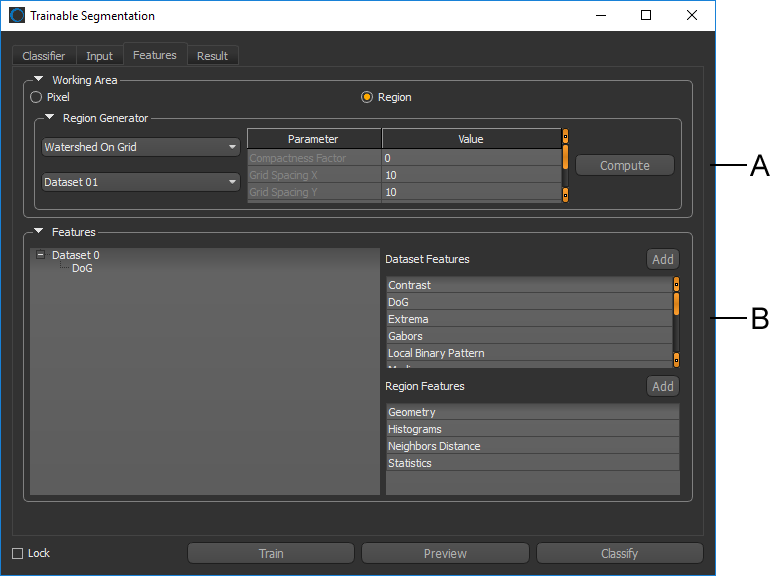
A. Working Area B. Features
 Working Area
The working area — Pixel or Region — determines whether the classifier is trained based on pixels only or the pixels within region features.
Pixel-Based Training
In pixel-based training, the dataset features extracted are the intensity value(s) of the pixel directly. In this case, the feature vector has the same length as the number of pixels in the image (see Dataset Features).
Region-Based Training
In region-based training, the region features is the information extracted from the intensities of the pixels in a given region. In this case, the feature vector has the same length as the number of regions defined for the image (see Region Features).
Working on regions increases the statistics of the feature vector provided to the classifier so it is less likely to be sensitive to noise. However, the way the regions are defined is crucial because they must group together pixels corresponding to the same class. If a region overlaps pixels of different classes, it can confuse the classifier. Whenever possible, you should create segmentation labels after the region has been generated.
Region working area
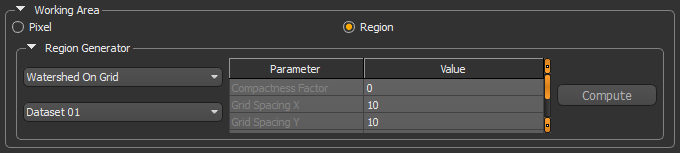
The different algorithms that can be used to generate regions from the selected dataset are described below. In future releases of Dragonfly you will be able to provide your own region generators.
|
|
Description |
|---|---|
|
Watershed on Grid |
This algorithm applies a Gaussian filter, and two sequential Watersheds. The first Watershed is applied using the Sobel of the provided dataset as the landscape and a 2D grid as the seeds. The 2D grid is defined by a given X and Y spacing. If a seed point is on a maximum of the Sobel, it is moved in the direction of the gradient. The second Watershed is applied still using the Sobel of the provided dataset as the landscape, but using the output of the first Watershed as the seeds for the regions bigger than a given number of pixels. The smaller regions with irrelevant statistics are therefore eliminated. |
|
Super Pixels |
The algorithm applies a Gaussian filter and simple linear iterative clustering (SLIC). |
|
Super Pixels Scikit |
This region generator is implemented from the scikit-image collection of algorithms for image processing. REF: http://scikit-image.org/docs/dev/api/skimage.segmentation.html#skimage.segmentation.slic |
|
Watershed on Grid Scikit |
This region generator is implemented from the scikit-image collection of algorithms for image processing. REF: http://scikit-image.org/docs/dev/api/skimage.morphology.html#skimage.morphology.watershed |
How to Generate a Region
- Choose Region as a working area on the Features panel.
- Choose a region generator in the Region Generator drop-down menu.
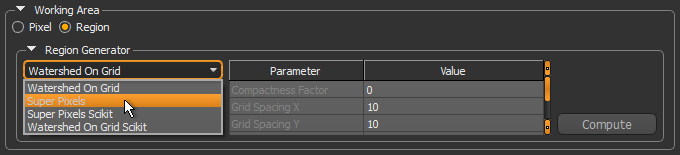
Refer to the table Region generators for information about the available region generators and the parameters associated with each generator.
- Modify the default settings of the selected region generator, if required.
- Select the dataset that will used to compute the region in the Dataset drop-down menu.
- Click the Compute button to preview the generated regions.
- Evaluate the result, recommended.
- If required, modify the settings of the selected region generator or try a different generator.
Features
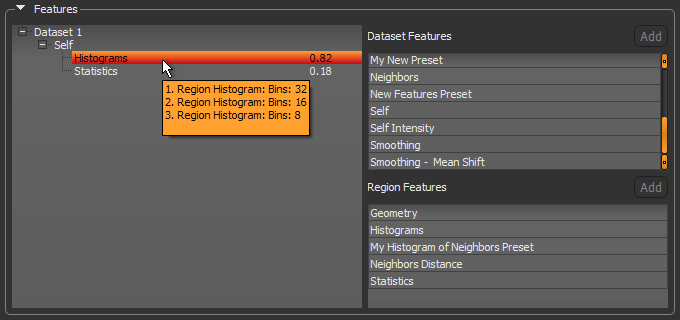
Datasets added to the Input Panel are automatically added to the features tree since they are the base to which dataset or region features presets can be added. Each feature preset added to the tree gives more information to the trainer. After training, the relevance of each feature preset, on a scale from 0 to 1, is displayed in the tree to help you judge whether the feature preset provides useful information to the classifier or not. Features determined to be ineffective can be removed from the features tree.
Whenever a feature preset is added to the features tree of the current classifier, a copy is made and saved with the model. You can then edit the copy without editing the default features preset. Dataset features presets must be added to a dataset, while region features must be added to a dataset feature. It is possible to preview dataset features and region features during the training workflow and prior to segmentation.
Refer to the topics in Features Presets for information about the default feature presets, editing and previewing presets, as well as creating new presets.
Dataset Features
The dataset features presets are a stack of filters that are applied to a dataset to extract information to train a classifier.
The default dataset feature presets are saved in the directory C:\ProgramData\ORS\Dragonflyxx\Data\OrsTrainer\FeaturePresets. Copied presets are saved with the classifier in the model directory.
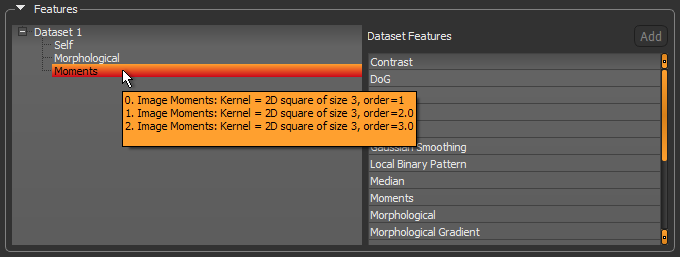
As shown below, a brief description of each filter in the stack of the currently selected preset is displayed on hover.
Dataset features
Region Features
When the classifier works on regions and not directly on the pixel level, information is extracted from regions to build the feature vector. The features extracted from the region are different metrics used to represent the region itself. For example, the histograms of the intensities of the pixels in the given region, or to compare a given region and its surrounding, as is done with the Earth Movers Distance metric. Other metrics can be added as required.
Default region feature presets are saved in the directory C:\ProgramData\ORS\Dragonflyxx\Data\OrsTrainer\RegionFeaturePresets. Copied presets are saved with the classifier in the model directory.
As shown below, a brief description of each filter in the stack of the currently selected preset is displayed on hover.
Region features
Many metrics are based on the histogram of the pixels in a given region. It uses the range of data of the dataset input as the range for histogram binning. The number of bins can have an impact on the result.